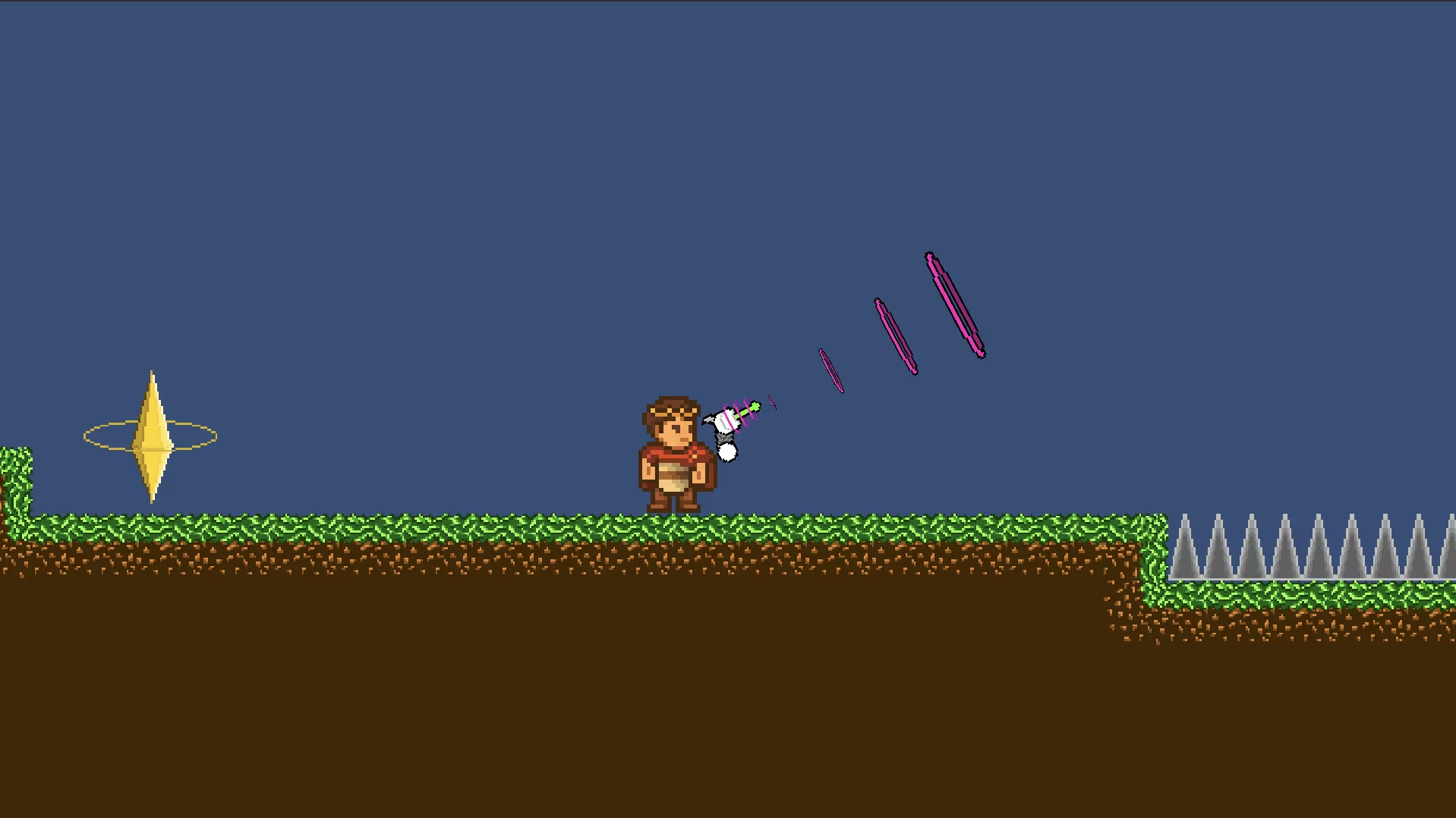

I made a few abilities for my platformer game made using Unity. the goal was for each ability to represent a period of time, be it the past, the present or the future.
The Raygun
This ability is the one supposed to represent the future. I had so many possible choices for that, with the future as a theme, I could make anything I could’ve wanted as long as it looked futuristic enough, portals, laserbeams or even teleporters !But as a huge fan of space and physics, I wanted something that had to do with gravity. And so I made this, the raygun.
it shoots out rays which, despite not dealing any damages to ennemies, can push them and any physical object away. this way the player would not only have a way to push obstacles away, but also a way to jump higher and slow down or accelerate his falls at will !
How does it work ?
1. the raygun
private void Update(){
    Vector2 mousePos = Mouse.current.position.ReadValue();
    Vector2 worldPoint = mainCamera.ScreenToWorldPoint(mousePos);
    Vector2 direction = worldPoint - (Vector2)transform.position;
    float angle = Mathf.Atan2(direction.y, direction.x) * Mathf.Rad2Deg;
    weapon.rotation = Quaternion.Euler(0, 0, angle);
    weapon.position = transform.position + (Vector3)(direction.normalized * RaygunDistance);
    if (weaponObject.transform.localPosition.x < 0)
    {
        weaponSpriteRenderer.flipY = true;
    } else {
        weaponSpriteRenderer.flipY = false;
    }
    if (isShooting){
        rb.AddForce(-new Vector2(weapon.position.x - transform.position.x, weapon.position.y - transform.position.y) * recoilForce * Time.deltaTime, ForceMode2D.Impulse);
        if (Time.time > shootInterval){
            ShootRaygun();
            shootInterval = Time.time + 0.2f;
        }
    }
    if (InputActions.Player.Shoot.WasPressedThisFrame()){
        SoundManager.Instance.PlaySound2D("raygun");
        isShooting = true;
    }
    if (InputActions.Player.Shoot.WasReleasedThisFrame()){
        isShooting = false;
    }
}
just like for the other two weapons, in the update fonction of the raygun he has a first part which allows the player to aim the weapon.
But the other half is quiet different.
if (InputActions.Player.Shoot.WasPressedThisFrame()){
    SoundManager.Instance.PlaySound2D("raygun");
    isShooting = true;
}
if (InputActions.Player.Shoot.WasReleasedThisFrame()){
    isShooting = false;
}
This part of the code basically allows me to say when does the plaer start shooting and when he stops. If the player presses the shoot button it changes the isShooting variable to true and if he stops it changes it to false.
if (isShooting){
    rb.AddForce(-new Vector2(weapon.position.x - transform.position.x, weapon.position.y - transform.position.y) * recoilForce * Time.deltaTime, ForceMode2D.Impulse);
    if (Time.time > shootInterval){
        ShootRaygun();
        shootInterval = Time.time + 0.2f;
    }
}
This part is a bit more interresting already. At first I wanted to add the recoil of the raygun directly in the shooting function but it let to a problem. It would feel as being thrown repeatedly when what I was going for was the feeling of being pushed away.
So I decided to make it a bit differently. every frame it adds a much lower recoil but it only shoots out the projectles at a set interval. This way the player can still use it as a sort of glider for a bit before he accelerate downwards too much.
2. the ray
void FixedUpdate()
{
    if (Vector2.Distance(startingPosition, transform.position) > maxDistance)
    {
        Destroy(gameObject);
    }
    transform.localScale = Vector2.Distance(startingPosition, transform.position) / maxDistance * maxScale;
}

void OnTriggerEnter2D(Collider2D collision)
{
    if (collision.gameObject.GetComponent<Rigidbody2D>() != null && collision.gameObject.tag != "ray" && collision.gameObject.tag != "Player")
    {
        Rigidbody2D rigidbody = collision.gameObject.GetComponent<Rigidbody2D>();
        if (rigidbody.bodyType == RigidbodyType2D.Dynamic || rigidbody.bodyType == RigidbodyType2D.Kinematic)
        {
            rigidbody.AddForce(rb.linearVelocity * force, ForceMode2D.Impulse);
        }
    }
}
The projectile works with these two functions.
void FixedUpdate()
{
    if (Vector2.Distance(startingPosition, transform.position) > maxDistance)
    {
        Destroy(gameObject);
    }
    transform.localScale = Vector2.Distance(startingPosition, transform.position) / maxDistance * maxScale;
}
This one simply changes the size of the ray depending on how what percent of its maximum distance it has traveled and deletes the ray when it goes past that distance.
void OnTriggerEnter2D(Collider2D collision)
{
    if (collision.gameObject.GetComponent<Rigidbody2D>() != null && collision.gameObject.tag != "ray" && collision.gameObject.tag != "Player")
    {
        Rigidbody2D rigidbody = collision.gameObject.GetComponent<Rigidbody2D>();
        if (rigidbody.bodyType == RigidbodyType2D.Dynamic || rigidbody.bodyType == RigidbodyType2D.Kinematic)
        {
            rigidbody.AddForce(rb.linearVelocity * force, ForceMode2D.Impulse);
        }
    }
}
This function works pretty normally, whenever the ray hits an object, it gets its rigidbody, the element that handles the physics of the game objects in unity. using it, if the object’s rigidbody is set to dynamic, it pushes if a bit.
if (collision.gameObject.GetComponent<Rigidbody2D>() != null && collision.gameObject.tag != "ray" && collision.gameObject.tag != "Player")
I added this line because the player could push himself by shooting it upwards and jumping in the projectile otherwise.